
תיאור
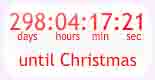
Christmas countdown clock showing days and hours until Christmas day. Select from several designs, sizes, animations and backgrounds
- Select from a range of designs
- Select size, background colours, pictures or animations
- Full range of designs can be seen at mycountdown.org
צילומי מסך


התקנה
- Download the zip file and extract the contents,
- Upload the folder
christmas-countdown-clockto your WP plugin folder/wp-content/plugins/directory, - Go to Plugins > Plugins, and activate the plugin,
- Go to Appearance > Widgets, and drag the widget to a sidebar,
- Select the countdown type, size, colors, or background from the setting menu
- Send us and email with any problems to widgets at mycountdown.org, we will make efforst to solve the problem
- Please rate our plugin!
שאלות נפוצות
-
How do I customize the colours?
-
Go to the Appearance->Widgets tab in your wordpress admin panel, and click on settings for the countdown clock. Select text, border and background colors from the drop downs
-
Can I set the time of day and world timezone for the event ?
-
Yes, select from the timezone dropdown the time zone in your area
-
Yes, the javascript code is available directly from mycountdown.org/christmas. You must paste the javascript into the page editor in HTML mode.
-
Is there support ?
-
Further support is available at mycountdown.org/support
-
Email & Twitter
-
Email us to widgets at mycountdown.org or twitter.com/mycountdown

מפתחים

ניתן לתרגם את "Christmas Countdown Clock" לשפה שלך.
מעוניינים בפיתוח?
עיינו בקוד, ראו את הקוד ב-SVN repository, או הירשמו ללוג פיתוח באמצעות RSS.
שינויים
1.1
- Released 08/03/2011
- Upgraded with timezone option
1.0
- Released 03/09/2010
- First release